Telegram with B4
B4 can keep Telegram working on a censored network in two ways. They are independent and can run at the same time:
- MTProto proxy server - clients add B4 as an MTProto proxy inside the Telegram app (with a secret). Use this when a device should connect to B4, for example a phone on a cellular network reaching your home B4.
- Telegram over WebSocket (transparent bridge) - a per-set routing mode that intercepts Telegram traffic from LAN devices and relays it for them. No in-app proxy and no secret. Use this to fix Telegram for every device behind B4 at once.
Both rely on the same Telegram upstream settings (how B4 itself reaches Telegram's data centers), so that section is described once and applies to either mode.
| Aspect | Proxy server | WebSocket bridge |
|---|---|---|
| Where configured | Settings → MTProto | A set's routing mode |
| Per-device setup | Add proxy + secret in Telegram | None (transparent) |
| Good for | One device reaching B4 (incl. remote/home) | All LAN devices at once |
| Needs MTProto on | Yes | No (independent) |
Telegram upstream (shared)
Settings → MTProto Proxy → Telegram upstream. This controls how B4 reaches Telegram's data centers. It is used by the proxy server and by the WebSocket bridge mode, so it applies even when the proxy server is turned off.
Transport mode
- Direct TCP - fastest. Use when the B4 host can reach
149.154.0.0/16directly (e.g. a VPS abroad). - Auto (WebSocket → TCP) - try WebSocket first via
kws*.web.telegram.org, fall back to direct TCP. Recommended on censored networks. - WebSocket only - strict WebSocket transport, no TCP fallback.
The transport-mode dropdown applies to the proxy server only. The WebSocket bridge routing mode always uses Auto (WebSocket-first with TCP fallback).
Cloudflare Worker domain (recommended fallback)
If media, reactions, or stickers fail to load, set a Cloudflare Worker domain. It is a free per-user WebSocket relay you host on your own Cloudflare account (*.workers.dev). B4 can reach any data center through it, so it rescues DCs with no native WebSocket edge (1, 3, 5) and connections throttled on the shared CF pool. The worker is tried after Telegram's own edge (so the fast native path still wins for DC 2/4) and before the shared CF pool.
Setup, in short:
- Create a free Cloudflare account.
- In Compute → Workers & Pages, create a Worker from the default template and deploy it.
- Replace the worker code with the proxy script, then redeploy.
- Copy the worker's
name-1234.username.workers.devdomain into the Cloudflare Worker domain field. Comma-separate multiple workers.
Make sure cloudflare.com, cloudflare.dev, and workers.dev are reachable (not blocked) on your network.
The worker script and the full step-by-step are maintained by tg-ws-proxy: CfWorker.md. B4 dials the worker at /apiws, matching that script.
CF proxy fallback
A rotating pool of Cloudflare-proxied domains used as a fallback when Telegram's native edge cannot reach a data center (notably DC 1, needed for media in foreign channels). The pool refreshes hourly.
Testing
- Test connection probes DC 2 over the configured transport(s) and reports latency.
- Test direct TCP probes DC 2 over direct TCP, bypassing any DC Relay, to isolate whether a problem is the relay or Telegram itself.
Option 1: MTProto proxy server
A Telegram proxy that clients connect to with a secret. B4 disguises the traffic as a regular HTTPS connection to a popular website.
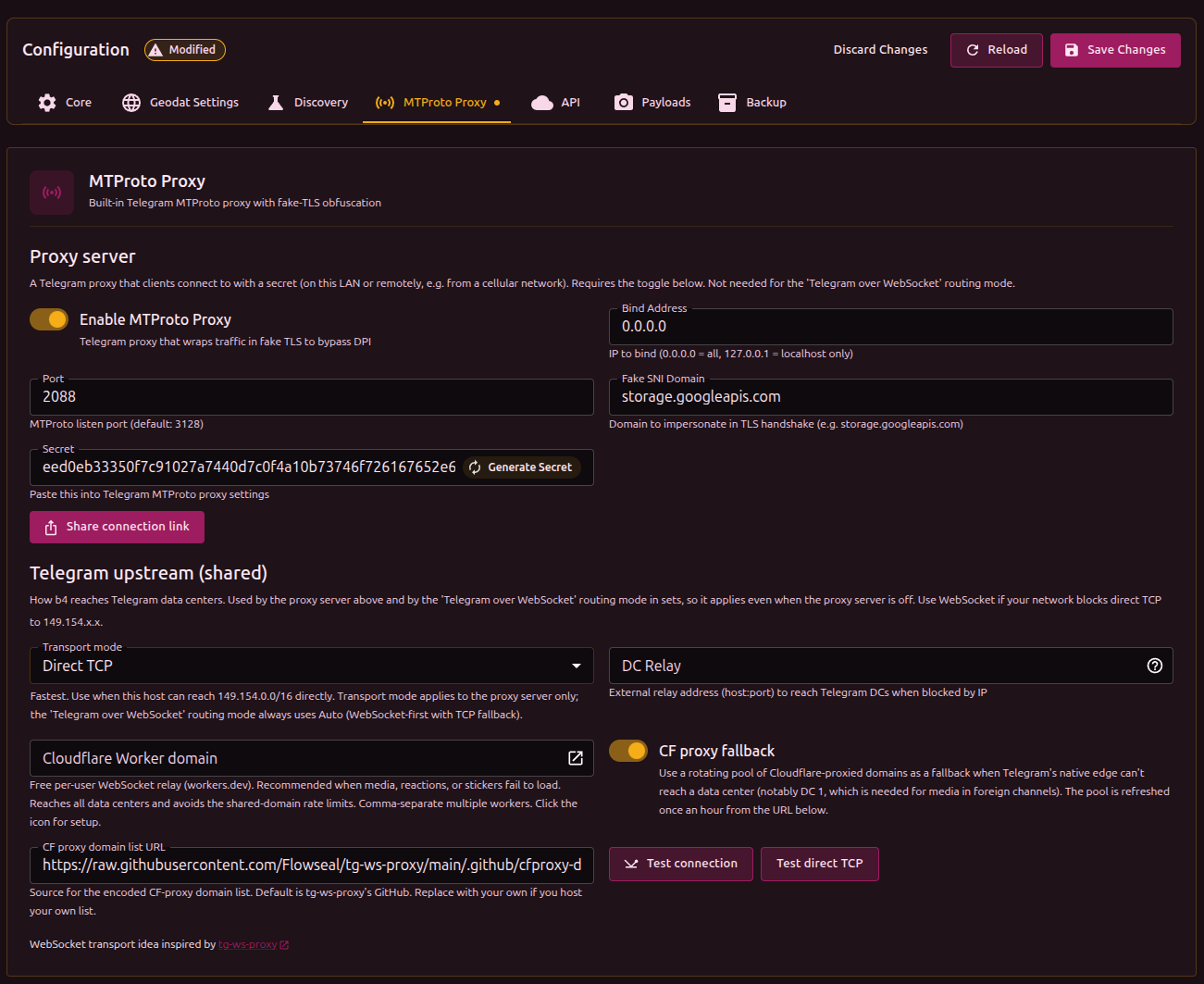
Step 1: Configure B4
In the B4 web UI → Settings → MTProto Proxy:
- Enable MTProto Proxy - turn it on
- Port - listen port (recommended:
443) - Fake SNI Domain - domain to impersonate (e.g.
storage.googleapis.com) - Click Generate Secret
- Copy the Secret value
- Save settings and restart B4
Set the Telegram upstream transport (above) according to where B4 runs:
- B4 on a VPS abroad - Direct TCP. B4 reaches Telegram directly; leave DC Relay empty.
- B4 on a router inside Russia - Auto (WebSocket → TCP). B4 reaches Telegram over the WebSocket edge, so no VPS relay is required. If WebSocket is also blocked on your network, use a DC Relay (below).
Step 2: Configure Telegram
- Open Telegram → Settings → Data and Storage → Proxy
- Tap Add Proxy
- Choose MTProto
- Fill in:
- Server: B4 IP or hostname (LAN IP for local devices; public IP or DDNS for remote use, with port forwarding)
- Port: the port from step 1
- Secret: the copied secret
- Tap Done and enable the proxy
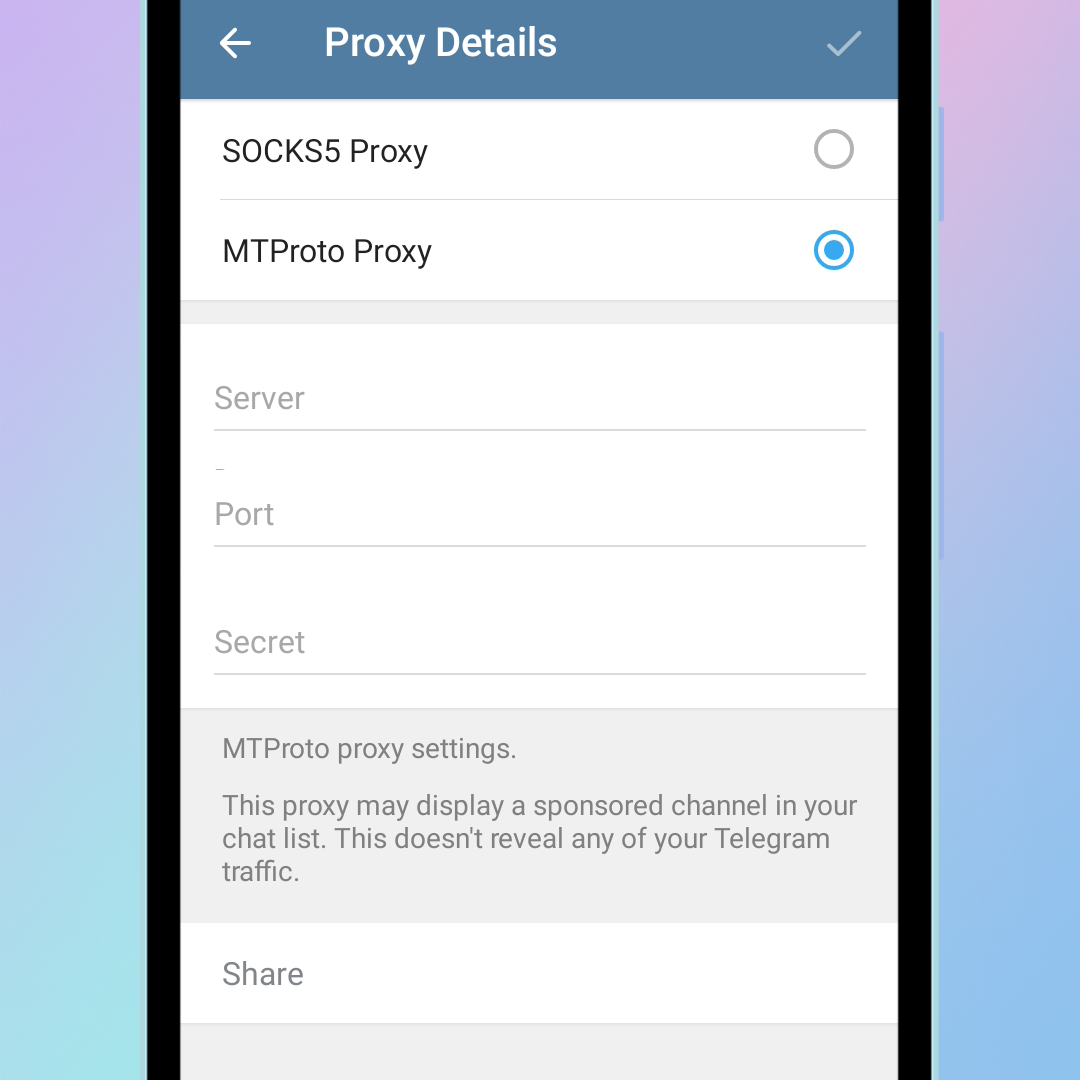
You can also use the Share connection link button to generate a tg://proxy link or QR code for another device.
Option 2: Telegram over WebSocket (transparent bridge)
A per-set routing mode that fixes Telegram for every device behind B4, with no in-app proxy and no VPS. When a device connects to a Telegram data center, B4 transparently intercepts the session and relays it over Telegram's WebSocket edge (with Cloudflare fallback).
This mode runs on its own. The MTProto proxy server under Settings → MTProto does not need to be enabled.
Setup
- Create or open a set and give it the
telegramtarget in both the geosite and geoip categories (so the set matches Telegram's domains and IP ranges). - In the set's Routing tab, enable routing and set Routing mode to Telegram over WebSocket (built-in).
- Choose the source interfaces (the LAN interfaces whose devices should be bridged). Leave empty to bridge all devices.
- Save.
A minimal set for this mode:
{
  "name": "telegram-ws",
  "targets": {
    "geosite_categories": ["telegram"],
    "geoip_categories": ["telegram"]
  },
  "enabled": true,
  "routing": { "enabled": true, "mode": "mtproto-ws" }
}
The shared Telegram upstream settings (Settings → MTProto) apply here, so configure a Cloudflare Worker domain there if media fails to load.
Only TCP MTProto sessions are bridged. Voice calls and transports B4 cannot map to a data center fall open to a direct connection.
DC Relay (VPS + socat)
Use a DC Relay only when B4 runs inside the censored zone and the WebSocket transport is also blocked, so direct IP-level connections to Telegram must go through a VPS.
Phone ──────▶ B4 (router) ──────▶ VPS ──────▶ Telegram
       TSPU sees                 TSPU sees
   "HTTPS to google.com"      "traffic to VPS"
       (not blocked)            (not blocked)
The VPS only needs a simple TCP forwarder (socat); no keys, no MTProto-specific software.
Step 1: Install socat on the VPS
apt install -y socat
Step 2: Set the DC Relay address
In Settings → MTProto Proxy, set DC Relay to the VPS address with the base port (e.g. my-vps.com:7007). The field appears when the transport mode is Direct TCP or Auto.
With Auto + a DC Relay configured, relay TCP is tried first and WebSocket is used as the fallback.
Step 3: Get the socat commands
Click the ? button next to the DC Relay field. The "DC Relay socat setup" dialog lists the current Telegram DCs and ready-to-run socat commands for each one (including the media DC). Click Copy all, switch to the VPS, and run them.
The DC list is fetched live from getProxyConfig - Telegram's own published list. B4 computes the relay port as base_port + |DC| - 1. If Telegram adds a new DC or changes an IP, the helper shows up-to-date commands without needing to update this guide.
Open every port the helper shows (the "Open these ports on the VPS firewall" line at the bottom of the dialog). This is typically 6 ports: five for the main DCs (1-5) and one for the media DC 203.
To auto-start socat, add the commands to /etc/rc.local or create a systemd service.
Choosing a fake SNI domain
The domain should be:
- popular in Russia
- not blocked
- critically important (so blocking it would break other services)
If someone connects to the B4 port without the correct secret, B4 transparently forwards them to the real site (the one configured in Fake SNI). A scanner sees an ordinary site, not a proxy.
Troubleshooting
Telegram shows "Connecting…"
- If using the WebSocket transport, run Test connection to confirm B4 can reach a DC.
- If using a DC Relay, make sure
socatis running on the VPS and the ports are reachable, and double-check the VPS address. - B4 logs should show
MTProto fake-TLS handshake OKandMTProto relaylines.
Media, stickers, or reactions fail to load
- Set a Cloudflare Worker domain in the Telegram upstream settings. DC 1 (media for foreign channels) is the usual culprit, and the CF Worker / CF proxy fallback rescues it.
Wrong secret
In the logs: HMAC verification failed. The secret in Telegram does not match the one configured in B4.
Clock skew
In the logs: timestamp out of range. The clocks on the device and the B4 machine disagree. Sync them (NTP).
VPS unreachable (DC Relay)
In the logs: dial DC ... i/o timeout.
- VPS is off, or
socatis not running - VPS firewall blocks inbound connections on the required ports
No response from Telegram
In the logs: DC->client: 0 bytes.
- Direct TCP and no relay: Telegram servers are blocked by IP. Switch the transport to Auto/WebSocket, or set up a DC Relay.
- DC Relay set:
socatis not running on the VPS, or the wrong port was specified.
Credits
The WebSocket transport and the Cloudflare Worker relay are inspired by tg-ws-proxy.