
Routing Rules
Routing rules determine which outbound handles specific traffic: proxy, direct (freedom), or block (blackhole). Rules are evaluated top to bottom — first match wins.
How Traffic Reaches Xray
Not all traffic automatically goes through Xray. There are three processing layers, and each one only works with what passed through the previous one.
Note
Before any of the three layers, XRAYUI unconditionally excludes service traffic: DHCP (67/68), NTP (123), IPsec/WireGuard (500/4500/4501/51820), multicast/broadcast, packets originated by the router itself, and traffic already in a DNAT state (inbound port-forwards). These packets never reach Xray, even if a policy would otherwise intercept them.
Layer 1: Interception (B/R Policies)
Bypass/Redirect policies determine which devices and ports are intercepted. Traffic that isn't intercepted goes direct — Xray never sees it.
Layer 2: DNS Bypass (before Xray)
Intercepted traffic can be further filtered before reaching Xray. This reduces router CPU load but limits routing flexibility.
By default, all intercepted traffic is redirected to Xray's dokodemo-door inbound port. On weak routers, this creates high CPU load under heavy traffic. DNS bypass solves this by filtering traffic at the iptables/ipset level before Xray.
Modes
OFF — all intercepted traffic goes to Xray. Routing rules work fully.
BYPASS — extracts domains from rules with
freedomoutbound type. Traffic to those domains skips Xray and goes direct. For example, a ruledomain:ru→freedommeans all.rutraffic bypasses Xray. Everything else enters Xray.REDIRECT — inverse of BYPASS. Extracts domains from rules with outbound type other than
freedom, and only that traffic enters Xray. For example, a rulegeosite:youtube→proxymeans only YouTube traffic enters Xray; everything else goes direct.
Important
DNS bypass operates before Xray routing rules. Traffic filtered at this layer never reaches Xray, and routing rules won't apply to it.
Note
Geodata categories occasionally contain entries with the regexp: prefix. These are ignored by DNS bypass — ipset doesn't support regular expressions.
Layer 3: Xray Routing Rules
Traffic that passes through the previous layers is processed by Xray's routing rules — the rest of this document covers them.
Domain Syntax
Prefixes
| Prefix | Behavior | Example |
|---|---|---|
domain: | Domain + all subdomains | domain:google.com → google.com, maps.google.com |
full: | Exact match only | full:google.com → only google.com |
keyword: | Contains substring | keyword:google → google.com, mygooglesite.net |
regexp: | Regular expression | regexp:.*\.edu$ → harvard.edu, mit.edu |
geosite: | Geosite database category | geosite:netflix → all Netflix domains |
ext:xrayui: | Custom domain list | ext:xrayui:mylist → domains from your custom list |
domain: matching examples
domain:com— all.comdomains and their subdomainsdomain:dmn.com—dmn.com,www.dmn.com,sub.domain.dmn.comdomain:www.dmn.com— onlywww.dmn.comand its subdomains, notdmn.com
Geosite Databases
Geosite files are community-maintained lists of domains grouped by category. Instead of manually listing dozens of domains for a service, you can use a single category tag.
Example — geosite:youtube includes youtube.com, youtu.be, youtube-nocookie.com, CDNs, regional domains, etc.
Common Categories
| Category | Description |
|---|---|
geosite:google | All Google services |
geosite:youtube | YouTube and related domains |
geosite:netflix | Netflix |
geosite:facebook | Facebook and Instagram |
geosite:twitter | Twitter/X |
geosite:telegram | Telegram |
geosite:spotify | Spotify |
geosite:category-ads-all | Ad networks |
geosite:category-media-ru | Blocked media in Russia |
geosite:cn | Chinese domains |
geosite:geolocation-!cn | Non-Chinese domains |
Full list of categories: v2fly/domain-list-community
Updating Databases
Manual: Routing → Update community files → Apply
Automatic: General Options → Geodata → Auto-update geodata files (updates at 03:00)
Custom Lists
You can create your own domain categories and use them in rules as ext:xrayui:name. Details: Geodata Files Manager.
GeoIP
| Category | Description |
|---|---|
geoip:cn | Chinese IP addresses |
geoip:us | US IP addresses |
geoip:private | Private/LAN addresses |
geoip:cloudflare | Cloudflare IPs |
Managing Rules
Interface
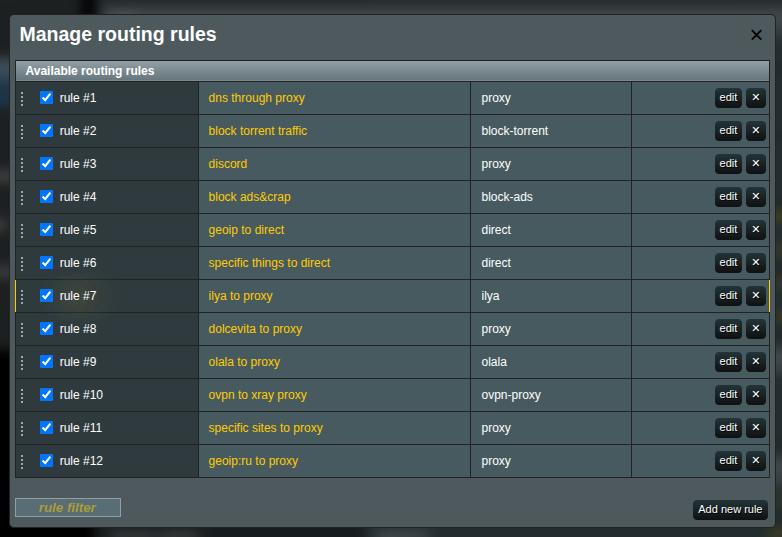
- Go to the Routing section

- Click Manage next to Rules
Adding a Rule
Click Add new rule. Fill in the fields:
| Field | Description |
|---|---|
| Friendly Name | Descriptive name for the rule |
| Outbound connection | Where to send traffic: proxy, direct, block |
| Enabled | Toggle rule on/off |
Matching Criteria
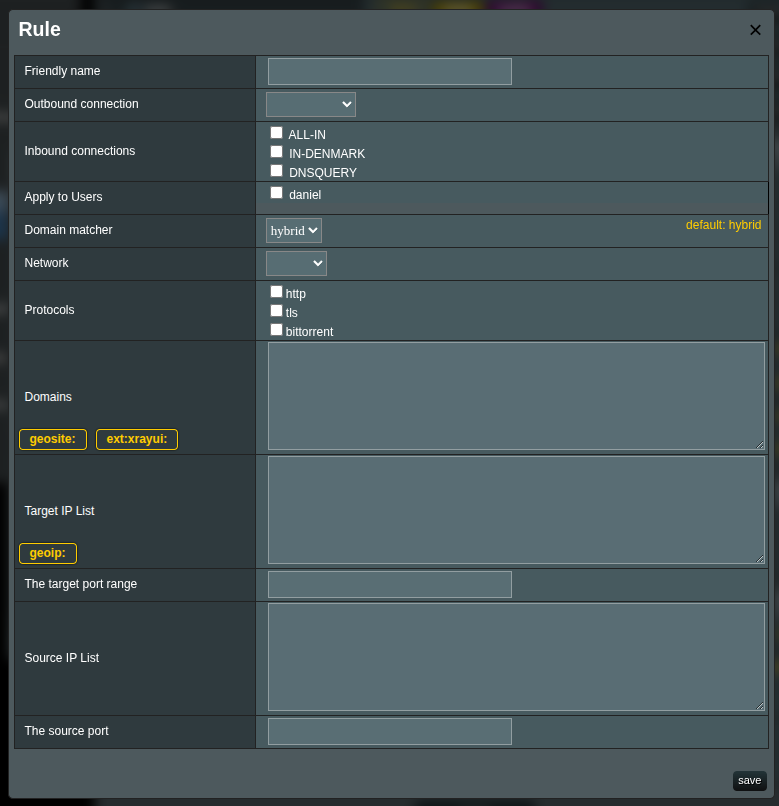
A rule can have one or more criteria. When multiple are specified, AND logic applies — all conditions must match.
Tips
If nothing is selected in a field, everything matches. You don't need to select all options to cover all traffic — just leave the field blank.
Domains
One per line. Supported formats: domain:, full:, keyword:, regexp:, geosite:, ext:xrayui:.
Tips
The geosite: and ext:xrayui: buttons above the input field insert the prefix. Autocomplete helps find available tags.
IP Addresses
192.168.1.1
192.168.1.0/24
geoip:cn
geoip:private
Source IPs
Filter by source device IP:
192.168.1.100
192.168.1.0/24
Ports
443
8080:8090
Note
Use colon (:) for ranges, not a hyphen.
Networks
- tcp — TCP only
- udp — UDP only (including QUIC/HTTP3)
- Empty — both
Protocols
- http, tls, bittorrent, quic
Detected by packet inspection, not port numbers.
Rule Order
Use the up/down buttons to reorder rules. More specific rules go higher, catch-all rules at the bottom.
Saving
- Save in the rule editor
- Apply on the main page
System Rules
Some rules are auto-generated (DNS, B/R policies). They can't be edited directly but can be disabled.
Disabling Rules
Uncheck a rule's checkbox — it moves to the "disabled" section and retains its configuration.
Example Rules
Netflix via proxy
Friendly Name: Netflix proxy
Outbound: proxy
Domains: geosite:netflix
Block ads
Friendly Name: Block ads
Outbound: block
Domains: geosite:category-ads-all
Local network direct
Friendly Name: LAN direct
Outbound: direct
IPs:
  geoip:private
Torrents direct
Friendly Name: Torrents direct
Outbound: direct
Protocols: bittorrent
Specific device HTTPS via proxy
Friendly Name: Laptop HTTPS proxy
Outbound: proxy
Source IPs: 192.168.1.100
Ports: 443
Networks: tcp
Common Routing Schemes
Proxy everything except local
Rule 1 — direct: IPs: geoip:private
Rule 2 — proxy:  (empty criteria = catch-all)
Only specific services via proxy
Rule 1 — proxy:  Domains: geosite:netflix, geosite:youtube
Rule 2 — direct: (catch-all)
Bypass regional restrictions (Russia)
Rule 1 — proxy:  Domains: geosite:category-media-ru
Rule 2 — direct: Domains: geosite:ru
Rule 3 — proxy:  Domains: geosite:geolocation-!ru
Performance optimization with DNS bypass
DNS Bypass: REDIRECT mode
B/R Policy: Redirect ports 80,443

Rules:
1. geosite:youtube → proxy
2. geosite:netflix → proxy
Only YouTube and Netflix go through Xray. Everything else bypasses at the iptables level.
Maximum control
DNS Bypass: OFF
B/R Policy: Redirect all

Rules:
1. domain:company.com → work-proxy
2. geosite:netflix → us-proxy
3. geosite:twitter → europe-proxy
4. ports:27000-27100 → direct
5. (catch-all) → proxy
All traffic goes through Xray for evaluation.
Advanced
Domain Matcher

- hybrid (default) — balanced speed and accuracy
- linear — sequential matching, more accurate but slower
Balancers
Balancers distribute traffic across multiple outbound connections. Instead of routing to a single outbound, a rule can route to a balancer, which then selects the best outbound based on the configured strategy.
When to use balancers
- You have multiple proxy servers and want to spread load across them
- You want automatic failover if one server goes down
- You want to route to the lowest-latency server
Managing balancers
Go to the Routing section
Click Manage next to Balancers

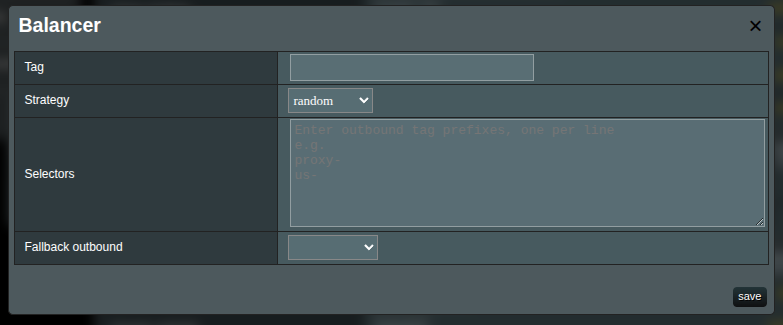
Click Add to create a new balancer
Balancer fields
| Field | Description |
|---|---|
| Tag | Unique identifier. Used to reference this balancer from routing rules via balancerTag. |
| Strategy | How the balancer picks an outbound (see below). |
| Selectors | Prefix patterns to match outbound tags. One per line. E.g., us- matches us-1. |
| Fallback outbound | Outbound to use if all matched outbounds are unavailable. Requires observatory. |
Strategies
| Strategy | Description |
|---|---|
random | Randomly selects a matched outbound. (Default) |
roundRobin | Selects matched outbounds in sequential order. |
leastPing | Selects the outbound with the lowest latency. Requires observatory. |
leastLoad | Selects the most stable outbound based on observations. Requires observatory. |
Note
The leastPing and leastLoad strategies require observatory or burstObservatory configuration in your Xray config to function. Without it, they behave like random.
Selector matching
Selectors use prefix matching against outbound tags. For example:
| Outbound tags | Selector | Matched |
|---|---|---|
us-1, us-2, eu-1, eu-2 | us- | us-1, us-2 |
proxy-a, proxy-b, direct | proxy- | proxy-a, proxy-b |
fast, fallback | f | fast, fallback |
The edit form shows a live preview of matching outbounds below the selector field.
Using balancers in rules
When editing a routing rule, choose Balancer as the target type instead of Outbound:
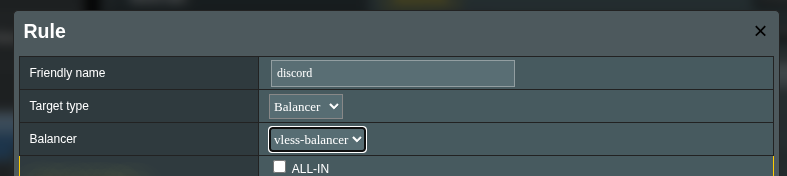
Then select the balancer tag from the dropdown. Rules with a balancer target show a ⚖ icon in the rules list.
Important
A rule can have either outboundTag or balancerTag, not both. Switching the target type clears the other field.
Example: Round-robin across US proxies
Create outbounds:
us-east,us-west,us-centralCreate a balancer:
Tag: us-balance
Strategy: roundRobin
Selectors: us-
Create a routing rule:
Friendly Name: US traffic balanced
Target type: Balancer
Balancer: us-balance
Domains: geosite:netflix, geosite:youtube
Example: Failover with fallback
Create outbounds:
primary-proxy,backup-proxyCreate a balancer:
Tag: failover
Strategy: leastPing
Selectors: primary-
Fallback outbound: backup-proxy
Route traffic to the
failoverbalancer. Ifprimary-proxybecomes unreachable, traffic automatically falls back tobackup-proxy.
Troubleshooting
Rules not working
- DNS bypass — traffic may be filtered before Xray. Temporarily set to OFF to test.
- B/R policies — traffic may not be intercepted. Check MAC addresses and ports.
- Rule order — specific rules must be above general ones.
- Outbound — verify the specified outbound exists.
- Syntax —
domain:notdomain.,geosite:notgeosite..
Traffic not being proxied
- DNS bypass in REDIRECT mode with the domain matching a
freedomrule - B/R policy doesn't include the needed ports
- QUIC/HTTP3 (UDP 443) not intercepted — add UDP 443 to the policy
Unexpected direct connections
- Ipset rules from DNS bypass creating kernel-level bypasses
- IPv6 traffic not being handled
- Cached DNS responses from a previous configuration
Debugging
Enable logs: General Options → Logs → Access logs, level info or debug.
tail -f /tmp/log/xray_access.log
Note
After any changes, click Apply on the main page to activate the new configuration.