
Securely Share a Configuration File
The Xray configuration file is a JSON file located in /opt/etc/xray. Its structure can be large and complex, and it always contains sensitive information (for example: VPS credentials, IP addresses, private and public keys, user IDs, and passwords).
When you are troubleshooting an issue, it can be helpful to share your configuration with the community. Before doing so, you must redact all sensitive data.
XRAYUI includes a built-in tool that automatically masks sensitive values in the configuration. The full list is in What is masked.
How to Mask and Share a Configuration File with XRAYUI
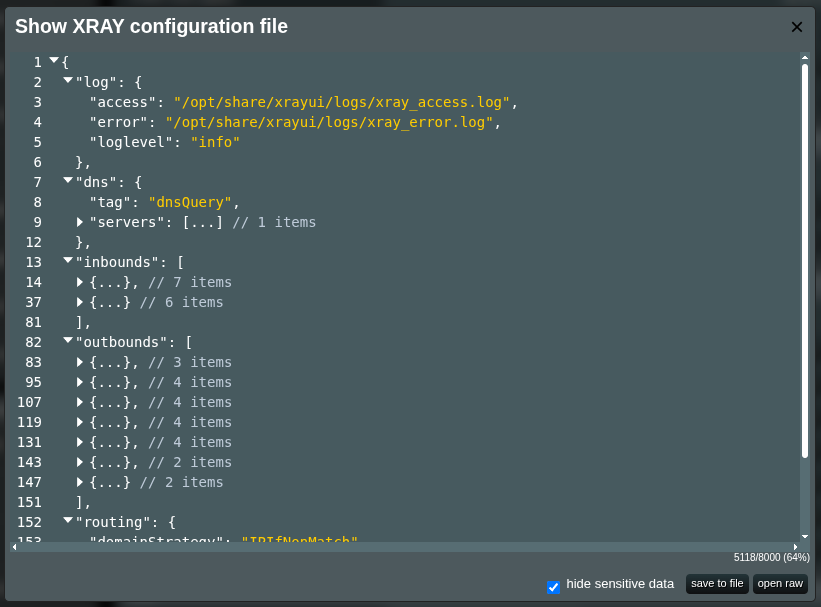
In the Configuration section, click Show Config.

A modal displaying your current configuration will appear. You can review the active configuration in your browser.
Warning
Do not copy the content directly from the modal. Nested sections are collapsed there, so the copied text is incomplete and is not valid JSON. Use Save to file instead.
In the bottom-right corner, you will find:
Hide sensitive datacheckbox — when selected, masks sensitive values in the configuration with*characters. It is selected again every time the modal opens.- Save to file — saves the current configuration as a JSON file. If the checkbox is selected, the saved file contains masked data. Verify that all sensitive values are masked before sharing.
- Open raw — opens the configuration file directly in the browser. This view is never masked.
Validate the file. You should see many fields are masked:
      "streamSettings": {
        "security": "reality",
        "realitySettings": {
          "dest": "*****************",
          "serverNames": [
            "*************"
          ],
          "privateKey": "*******************************************",
          "shortIds": [
            "****************",
            "****************",
            "****************"
          ],
          "publicKey": "*******************************************",
          "spiderX": "*"
        },
        "sockopt": {
          "domainStrategy": "UseIP"
        }
      }
Caution
Never share the raw configuration. Always use Save to file with Hide sensitive data enabled.
Tips
Uncheck the checkbox and press save to file to quickly download your current config file in raw format.
What Is Masked
- Passwords, user IDs, emails, and all private and public keys.
- Server addresses and domain names, paths, and HTTP headers.
- Subscription links, including the server link kept for outbounds in the Auto-fallback pool.
- Share links (
vless://,vmess://,trojan://and others) and UUIDs, in any field. - Single public IP addresses in routing rules, DNS hosts and listen addresses.
- Any masked value that appears again elsewhere, for example in a routing rule that sends the server's domain to
direct.
Protocols, transports, ports, tags and most of the routing rules (domain lists, IP ranges and local network addresses) stay readable, so the shared configuration is still useful for troubleshooting.