Splitting
The primary DPI bypass tool. The idea: break a TCP packet into pieces so the DPI cannot reassemble them and read the contents (in particular, the SNI field in the TLS ClientHello).
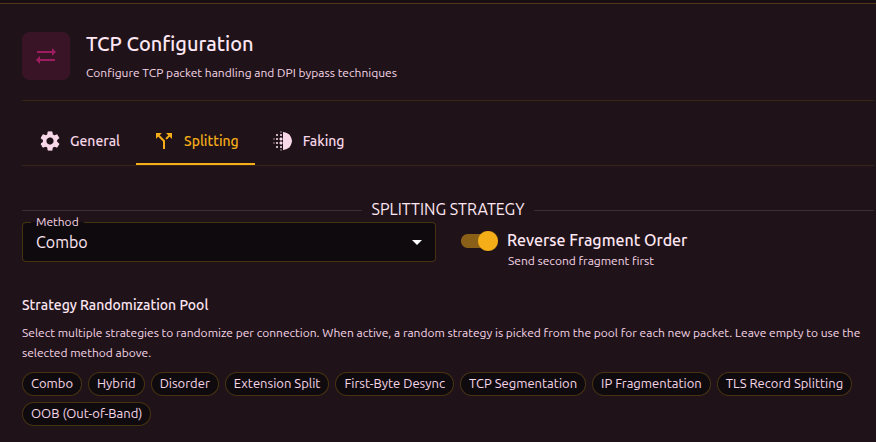
Splitting method
| Method | Description |
|---|---|
| tcp | Splitting at the TCP segment layer. One packet becomes two TCP segments |
| ip | Splitting at the IP layer. One IP packet is broken into IP fragments |
| tls | One TLS record is broken into several TLS records inside a single TCP packet |
| oob | Out-of-Band - inserts a byte with the TCP URG flag that throws off the DPI |
| combo | Combination of several split points with decoys, shuffling, and fakes between fragments |
| hybrid | Hybrid of combo and disorder - combined methods with reordered packets |
| disorder | Fragments are sent out of order with random delays |
| extsplit | Automatic splitting right before the SNI extension in the TLS ClientHello |
| firstbyte | Send a single byte, pause, then the rest - a timing attack |
| none | No splitting (use when only faking is needed) |
Use Discovery - it tests every method and finds one that works. Manual picking is for cases where discovery failed or you want to tune a specific case.
Strategy pool
When the pool is enabled, b4 picks a method at random from the pool for every new connection. This makes it harder for DPI to adapt to a specific method - each connection looks different.
Pick a few strategies that work on your provider (via discovery) and include them in the pool. The pool is ignored when empty - in that case the method selected above is used.
Reverse order
Sends fragments in reverse order (last fragment first). A DPI that expects data in order cannot reassemble the content.
TCP/IP Segmentation
Available for the tcp or ip method.
Smart SNI splitting
Automatically finds the SNI field in the TLS ClientHello and splits in the middle of the hostname. Try this first - no manual tuning required.
Fixed split position
Manual offset of the split point (0-50 bytes from the start of the TLS payload). Use this when smart splitting does not work on your provider. Specified as a min-max range - each connection picks a random position from the range.
When both options (smart SNI + fixed position) are enabled, the packet is split into 3 segments: at the fixed position and in the middle of the SNI.
Combo
Combines several split points with decoys and shuffling. The most flexible method.
Decoy
Sends a fake ClientHello with an allowed SNI before the real traffic:
- Fake packet (low TTL) -> DPI sees and analyzes it, but the packet does not reach the server
- Real packet (fragmented) -> passes the DPI and is delivered to the server
Split points

| Parameter | Description |
|---|---|
| First Byte | Split after the first byte (timing-based desync) |
| Extension Split | Split before the SNI extension |
| SNI Split | Split in the middle of the SNI hostname |
Each enabled split point adds another segment. The interface shows the number of active splits and the resulting number of segments.
At least one split point must be enabled, otherwise combo sends the packet as a single segment.
Shuffle mode
| Mode | Description |
|---|---|
middle | First and last segments keep their position, only the middle ones are shuffled |
full | All segments are shuffled randomly |
reverse | Segments are sent in reverse order |
Timing

| Parameter | Description | Range |
|---|---|---|
| First segment delay | Pause after sending the first segment | 10-500 ms |
| Max jitter | Random delay between the other segments | 100-10000 us |
Fake per segment (multidisorder)
Sends fake overlapping packets before every real segment, not only the first. Fills the DPI reassembler with junk.
| Parameter | Description | Range |
|---|---|---|
| Fake per segment | Send fakes between segments | - |
| Fakes per segment | Number of fake packets before each segment | 1-11 |
Disorder
Sends real TCP segments out of order with random delays. Unlike combo, disorder does not use fake packets (except in multidisorder) - it relies on the DPI expecting sequential data.
Disorder shuffle mode
| Mode | Description |
|---|---|
full | All segments are shuffled randomly |
reverse | Segments are sent in reverse order |
Timing jitter
Random delay between segments. Specified as a min-max range (us).
Jitter is used when Seg2Delay (inter-packet delay on the General tab) is 0. When Seg2Delay is set, it takes priority.
The maximum jitter must be greater than the minimum.
Sequence overlap (seqovl)
Adds fake bytes with a decreased TCP sequence number. The DPI sees a fake protocol header while the server discards the overlap (it already has the correct data).
| Pattern | What the DPI sees |
|---|---|
tls12 | TLS 1.2 header |
tls11 | TLS 1.1 header |
tls10 | TLS 1.0 header |
http_get | HTTP GET request |
zeros | Zero bytes |
custom | Custom hex bytes |
Multidisorder
Same as in combo - sends fake overlapping packets before each real segment.
Extension Split
Automatically splits the TLS ClientHello right before the SNI extension. The DPI sees an incomplete extension list and cannot parse the SNI.
[TLS Header] [Handshake] [Ciphers] [Ext1] [Ext2] | [SNI: youtube.com] [Ext...]
                                                   ^ split here
Extension Split works automatically. Use the Reverse order toggle and Inter-packet delay (Seg2Delay) on the General tab for extra tuning.
First-Byte Desync
Timing attack: sends a single byte (0x16 - the TLS record type), pauses, then sends the rest of the ClientHello. The DPI sees an incomplete TLS record and cannot parse the SNI before its timeout.
[0x16] ---- pause ---- [rest of the TLS ClientHello...]
The delay is controlled by Seg2Delay on the General tab. A minimum of 100 ms is applied automatically - if Seg2Delay is lower, b4 uses 100 ms.
OOB (Out-of-Band)
Injects a byte with the TCP URG (urgent) flag into the data stream. The server ignores OOB data (it is handled separately from the main stream), but a stateful DPI gets confused - it sees an extra byte that shifts its parsing.
| Parameter | Description | Range |
|---|---|---|
| Insert position | Number of bytes before the OOB insertion point. Specified as a min-max range | 1-50 |
| OOB byte | Byte sent via OOB (symbol + hex are shown) | - |
TLS Record Splitting
Splits the ClientHello into several TLS records inside a single TCP packet. A DPI that expects a single-record handshake cannot match its signature.
| Parameter | Description | Range |
|---|---|---|
| Split position | Size of the first TLS record in bytes. Specified as a min-max range | 1-100 |