Payloads
Why payloads exist
One of the DPI bypass strategies is sending fake packets (faking). b4 sends the provider a fake packet with decoy data, and sends the real packet in a way the DPI does not notice. The fake packet has to carry some data - that is the payload.
The fake packet is sent with a reduced TTL (time to live). It goes through the provider's equipment (the DPI sees and analyzes it), but does not reach the real server - the packet "dies" along the way. The server never sees the junk, and the DPI has already made its decision based on the fake.
Payload types
b4 supports several content types for fake packets. The type is selected in set settings: TCP -> Faking -> Payload type.
| Type | Contents | When to use |
|---|---|---|
| Random | 1200 random bytes | Default. Try this first |
| Google ClientHello | Prebuilt TLS ClientHello pretending to be Google | If the DPI lets Google traffic through |
| DuckDuckGo ClientHello | Prebuilt TLS ClientHello pretending to be DuckDuckGo | Alternative to Google |
| Captured Payload | Generated or uploaded payload | For advanced setup (see below) |
| Zeros | 1200 zero bytes (0x00) | Minimal CPU load |
| Inverted | Bitwise inversion of the original TLS packet | Looks like a corrupted packet |
Use what discovery suggests. When configuring manually, start with Random and try other options if that does not work. DPI behavior depends on the provider and can change over time.
Generating a payload (Captured Payload)
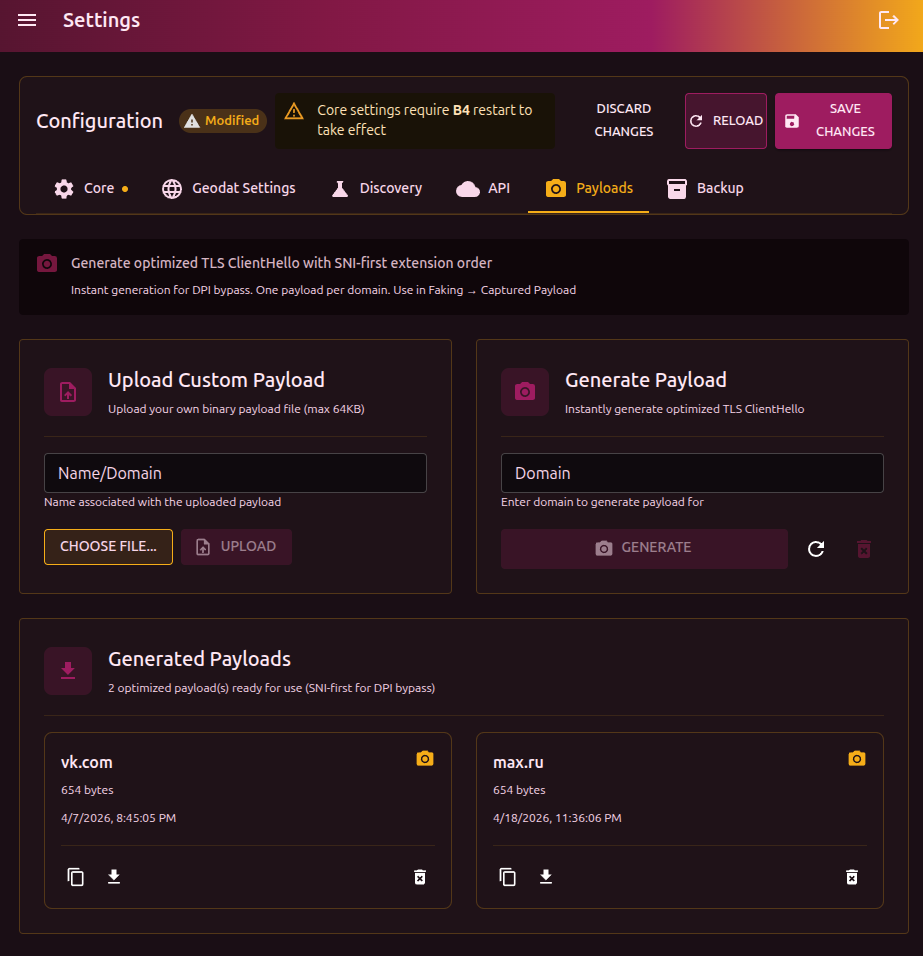
A generated payload is an optimized TLS ClientHello that looks like a real browser TLS handshake. Unlike random bytes, the DPI recognizes it as legitimate TLS and applies different handling rules.
Why SNI-first
Russian DPI (TSPU) uses an optimization: if the SNI extension in the TLS ClientHello is first, the system checks the domain against an allowlist and, if the domain is allowed, routes the connection through a fast path. b4 builds the ClientHello this way - with SNI first - to take advantage of this behavior.
How to generate
- Enter the domain in the Domain field (for example,
youtube.com) - Click Generate
b4 builds a ClientHello with a realistic set of TLS extensions and ciphers, SNI placed first. Generation is instant - no real connection to the site is made. One domain = one payload. Running generate again does not create a duplicate.
Uploading your own payload
If you have a binary file (.bin, up to 64 KB):
- Enter Name/Domain - the payload identifier
- Click Choose file and pick the
.bin - Click Upload
If the file name contains a domain (for example, tls_youtube_com.bin), the name field is filled in automatically.
Using in sets
Once generated, payloads become available in the set settings:
- Open the set -> TCP tab -> Faking section
- In the Payload type field pick Captured Payload
- In the list that appears, pick the payload by domain
Using in discovery
When running discovery you can supply payloads in Search parameters -> Custom payloads. Discovery tests every strategy with each of the listed payloads and picks the most effective combination.
If standard discovery (with the Random payload) does not find a working configuration, generate payloads for several domains and run discovery with them. Some providers react to the fake packet's contents, and a realistic ClientHello may work where random bytes did not.
Management
Each payload is shown as a card with the domain, size, and creation date.
| Action | Description |
|---|---|
| View hex | Show the contents in hex, copy to clipboard |
| Download .bin | Download as a binary file |
| Delete | Remove the payload |
| Clear all | Remove every payload (button in the header) |
Payloads are stored in the captures/ directory inside the b4 configuration directory (usually /etc/b4/captures/).